
By Smart Builder 360 Team | Principal Contributors: Kurt Shank & Dave Daugherty | Updated: November 21, 2026
This is general information, not legal advice. The Ohio rules summarized here come from our six Ohio guides, which cite the statutes and official sources. Rules change and have exceptions, so have an Ohio attorney review your contracts and lien paperwork, and check code questions with your building department.
An Ohio job runs on paper that other people check: the lender and title agency before each draw, the building department at each inspection, and the client on every extra. Good software keeps that paper with the job, so the office, the super and the lender work from the same numbers and dates.
Here's what that paper looks like on an Ohio job:
None of that needs a big enterprise platform. It needs one current record per job that the field, the office and the lender can all work from.
We've written six Ohio guides for builders and remodelers, each sourced to the Ohio Revised Code, the Residential Code of Ohio, state agencies, associations or local departments. Here's the key point of each in two sentences, with a link to the full guide when you need the details, the tables and the sources.
Ohio has no statewide license for general contractors, home builders or remodelers; the state licenses only commercial electrical, HVAC, plumbing, hydronics and refrigeration contractors. You register or get licensed with each city or county where you pull permits. Read the Ohio contractor license guide.
Liens on a one- or two-family home must be filed within 60 days of the last work, and within 75 days on most other jobs. Custom homes and remodels for an owner who lives there follow special rules: no notice of commencement unless the lender requires one, and no notice of furnishing. Read the Ohio mechanics lien guide.
A construction loan pays for a house or a remodel in stages, called draws. Before each one, the lender usually inspects the work, updates title and collects the builder's affidavit and lien releases. Read the Ohio construction loan guide.
OHBA is the statewide trade group for Ohio's home builders, remodelers and developers. You join through a local home builders association, and one membership covers the local, state and national levels. Read the OHBA membership guide.
The 2019 Residential Code of Ohio, based on the 2018 International Residential Code with 2024 updates, is still in force in November 2026, enforced by certified local departments. The Stark County Building Inspection Department covers the unincorporated county and contract villages, while Alliance, Canton, Massillon and North Canton have their own departments. Read the Residential Code of Ohio guide.
Get footings below your local frost line, which each building department sets, and the house under roof before the ground freezes, then move crews inside. A plan approval is void if work stops for more than six months unless you get an extension, so call your department before a long shutdown. Read the winter construction guide.
Smart Builder 360 keeps the job's paperwork in one system, from the first estimate to the last draw. It covers estimating, proposals, bids, selections, scheduling, change orders, bank draw forms, the project statement and estimated vs actual cost. The table shows each step of an Ohio job and what the app does there.
| Job step | In Smart Builder 360 | Ohio guide |
|---|---|---|
| Estimate and bid | Project estimates by cost category, bids sent to and collected from your trades, and proposals for the client. | Contracts and deposits |
| Contract and selections | Client selections, recorded and approved, and specifications tied to them. | Chapter 4722 contracts |
| Plan approval and inspections | A Files area (Final Items, Drawings, Job Photos, Quotes, Meeting Minutes) for the plan approval, the approved plans and a photo of the inspection record after each inspection. | Residential Code of Ohio |
| Schedule | A project schedule with a Gantt and calendar view, calendar templates and Google Calendar sync. You move dates yourself when weather or an inspection slips. | Winter construction |
| Changes | Signature-ready change orders. Digital Signatures is a $10 a month add-on. | Extras over $5,000 |
| Draws | You enter the milestone, amount and percent complete, and the app makes its own bank draw form, with documents and lien waiver notes kept with that draw. Signed waivers go in Files. | Construction loans, liens |
| Money | The project statement shows what's been paid and what's still owed. Estimated vs actual shows estimated, committed and actual cost side by side. | Construction loans |
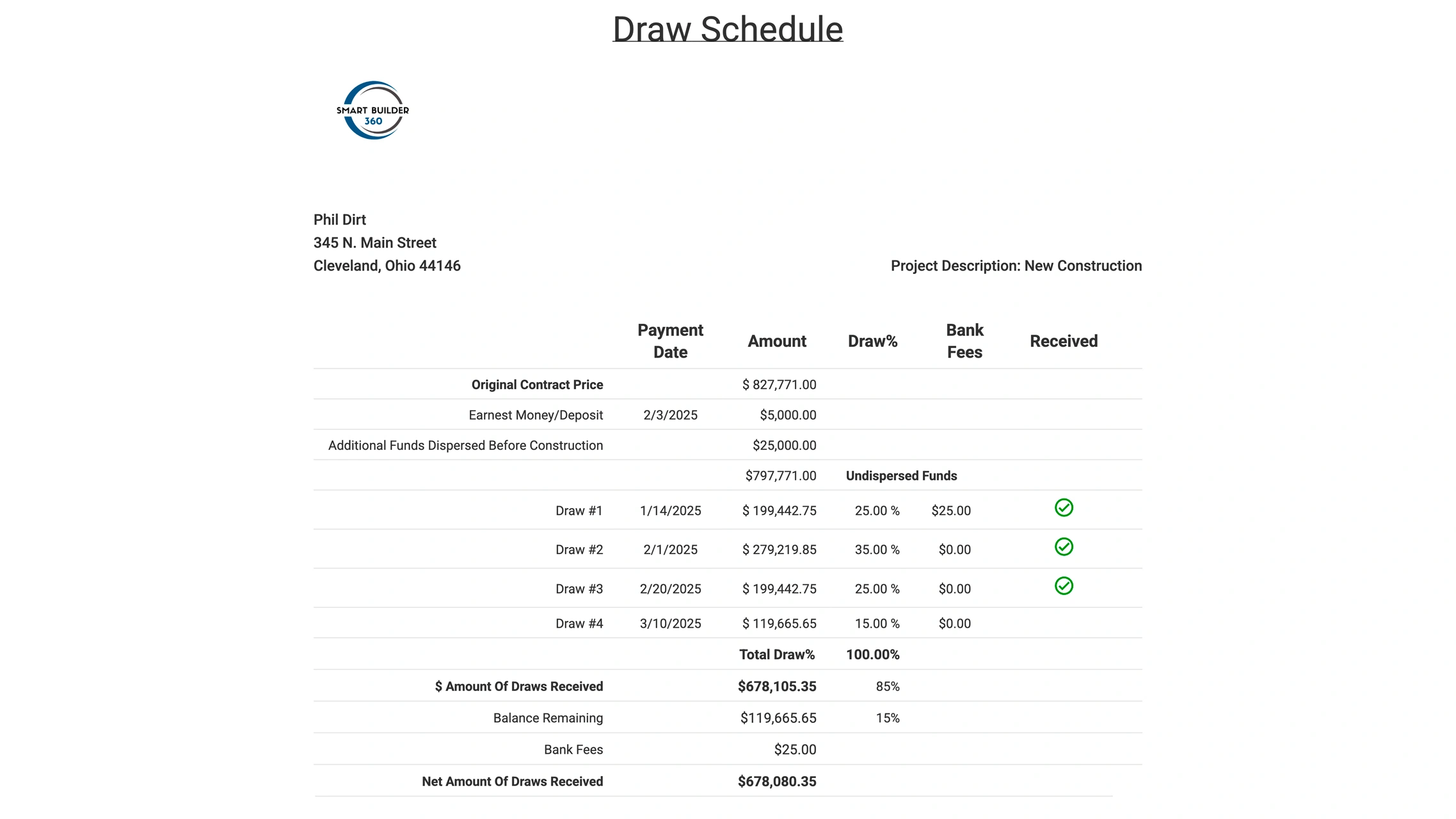
On a financed new home, the draw is where it pays off. A passed frame inspection, the photo of the inspection record, the draw form and the lien waiver notes for that stage all sit in the same job, so when the lender or the title agency asks, the office has the answer. On a remodel, the change orders and the statement do most of the work. The features page lists all ten modules.
Smart Builder 360 is a job record, not a filing service. It doesn't pull permits, schedule inspections, file liens or notices, or make lien waiver forms. It doesn't watch the weather or move dates on its own, and it doesn't fill in a bank's own draw form. Here's where each of those jobs stays.
Smart Builder 360 is built for small-to-mid residential builders and remodelers, especially in Ohio. It was built by a builder with 35+ years on job sites, and Kurt Shank and Dave Daugherty are the principal contributors to the Ohio guides on this site, including this one and the six linked above.
Smart Builder 360 is endorsed as the Official construction software of The Building Industry Association of Stark & East central Ohio. The Building Industry Association of Stark & East Central Ohio is the local home builders association for Stark County, home to Canton, and for Tuscarawas, Carroll, Harrison and Jefferson counties.
Three people usually make the call, and each gets something different:
Compare software on the jobs you actually run. Take one real Ohio job, a financed new home or a cash remodel, and walk it through each trial: the estimate, a change order, the schedule and a draw. Then compare the full monthly price for your team, not the starting price on the ad.
Questions worth asking every vendor, including us:
Be fair to yourself and to the tools. If you're a large commercial contractor managing tens of millions in volume, Smart Builder 360 isn't your tool; Procore is a more natural fit. If you rarely build on a construction loan, draw forms matter less, and change orders, selections and the statement should carry the decision. For an honest feature-by-feature comparison with the two tools small builders most often weigh against us, see the JobTread alternative and Buildertrend alternative pages.
Our roundup of the best construction software for small builders compares Smart Builder 360, JobTread, Contractor Foreman and others side by side. There are also BuildBook and Procore alternative pages, and our construction software pricing guide.
Smart Builder 360 costs $199 a month on the monthly plan, which includes 1 user, after a free 30-day trial with no credit card required. Each additional user is $20 a month, and the Digital Signatures add-on is $10 a month. The annual plan is $2,189 a year, with additional users at $220 a year each.
Example: a 5-person team on the monthly plan with Digital Signatures pays $199 + 4 × $20 + $10 = $289 a month. On the annual plan, the same team pays $2,189 + 4 × $220 + $110 = $3,179 a year. The full details are on the pricing page.
How to test it in the 30-day trial:
If you decide it isn't for you, the site's FAQ says you cancel with "Cancel Plan" under the Settings tab.
Try Smart Builder 360 free for 30 days.
For Ohio home builders and remodelers: estimates, scheduling, signature-ready change orders, client selections, bank draw forms and project statements in one place. No credit card required, then $199 a month for 1 user on the monthly plan.
Start my free trialIt depends on your size and how you get paid. Compare tools on draws, change orders, scheduling and the full monthly price for your team. Smart Builder 360 is built for small-to-mid Ohio builders and remodelers, with bank draw forms built in, at $199 a month. Large commercial contractors usually fit Procore better.
Yes. You enter the milestone, amount and percent complete, and the app makes its own bank draw form, with documents and lien waiver notes kept with that draw. It doesn't fill in a bank's own form. On a home construction contract, Ohio law also bars the lender from paying you until you sign the section 1311.011 affidavit.
No. It doesn't pull permits, schedule inspections or watch the weather. Its Files area holds the plan approval, the approved plans and photos of each inspection record, and its schedule has a Gantt and calendar view, calendar templates and Google Calendar sync. You move dates yourself when an inspection or the weather slips.
$199 a month on the monthly plan, which includes 1 user, after a free 30-day trial with no credit card required. Each additional user is $20 a month, and Digital Signatures is a $10 a month add-on. A 5-person team with Digital Signatures pays $199 + 4 × $20 + $10 = $289 a month. The annual plan is $2,189 a year.
Yes, if your pain is extras and keeping track of what's paid. Most remodels are paid by the homeowner directly, not through bank draws, so signature-ready change orders, client selections and the project statement matter most. The draw forms are there when a job is financed through a construction loan.
Yes, but on a 203(k) or HomeStyle remodel the lender still uses its own draw forms. Smart Builder 360 keeps the numbers behind them: what's been drawn and the approved change orders. Get every change order signed and send it to the lender, because a HomeStyle loan can't grow to cover overruns, and a 203(k) has only its contingency reserve.
Checked November 21, 2026. The Ohio facts on this page are summarized from our six Ohio guides, which list every source in full. The main official sources behind the facts repeated here:

Our team of experts is ready to help around the clock.
