
By Smart Builder 360 Team | Principal Contributors: Kurt Shank & Dave Daugherty | Updated: October 22, 2026
Most small builders pay somewhere between about $50 and a few hundred dollars a month for construction management software. The wide range comes from plan size, user count and how the vendor charges. Larger platforms skip public prices and quote by annual construction volume.
That is a big spread, so it helps to compare the same things across vendors: what the plan includes, how many people can log in, what costs extra, and what happens at renewal. A low monthly number can hide a lot, and a higher one can include everything you need.
This guide uses only construction software pricing that we checked on each vendor's own pricing page. Where a price was not public, or a page would not load, we say so and leave the number out.
Construction software pricing usually follows one of four models: a flat monthly plan, a price per user, tiered plans by features or users, or a quote based on how much construction you run each year. Many vendors mix two of these, such as a base plan plus a per-user fee.
| Pricing model | How it works | Good fit for | Watch out for |
|---|---|---|---|
| Flat plan | One monthly or annual price, set number of users | Small teams that want a predictable bill | Check how many users are included and what extra users cost |
| Per user | A base fee plus a charge for each extra person | Teams that add or remove staff | The bill grows as your office and field crew grow |
| Tiered plans | Higher tiers add users and features | Builders who want to start small | The feature you need may only be on a higher tier |
| Quote by volume | An annual fee based on how much construction you do | Large contractors with many projects | No public price, so you compare by asking for written quotes |
For a small residential builder, a flat plan or a base plus a per-user fee is the easiest to budget. You can work out your yearly cost before you sign, and you know what each new hire adds.
Here is how the published prices of several construction software vendors compare for a small team. We read each price on the vendor's own pricing page on October 22, 2026, and left out anything we could not verify. Prices change, so confirm on the vendor's site before you decide.
| Vendor | Published price | Users | Source |
|---|---|---|---|
| Contractor Foreman | Basic $49/month, Plus $166/month, Unlimited $332/month when billed annually. Monthly billing: Plus $199, Unlimited $399. | Basic 1, Plus up to 8, Unlimited unlimited | Pricing page |
| JobTread | One plan at $199/month plus $20/month for each extra internal user on monthly billing | 1 included, price breaks as users grow | Pricing page |
| Procore | No public price. An annual fee by product, based on annual construction volume | Unlimited users | Pricing page |
| Smart Builder 360 | $199/month or $2,189/year, plus $20/month ($220/year) per additional user | Choose from 1 to 10 on the pricing page | Our pricing page |
We did not list Buildertrend because we could not read a public price from its pricing page on the day we checked. If you are looking at it, ask the vendor for a written quote that spells out the plan, the users and the renewal terms.
Look closely at the numbers: several vendors land in a similar range for a small team, so price alone rarely settles the choice. What you get for it matters more, and the next sections cover that. We also wrote about price increases and renewals reported by software reviewers.
Monthly construction software pricing is only part of the real cost. Extra users, add-ons, setup help, contract length and renewal changes can all move the number. Add them up over a full year, and over three years, before you compare one vendor with another.
A simple test: ask each vendor for the total you will pay in year one, year two and year three for your real team size. Put the answers side by side.
As an example, take a three-person team on Smart Builder 360: the owner and two more people. On the monthly plan, that is $199 plus two extra users at $20 each, or $239 a month. On the annual plan, it is $2,189 plus two extra users at $220 each, or $2,629 a year.
These are example numbers built from our public prices, to show the arithmetic. Your own total depends on your user count and add-ons. Do the same sum for every vendor on your list, using their published prices.
Then compare that yearly total with what the software does for you. If one tool replaces a separate estimating spreadsheet, a proposal template and a place to keep draw paperwork, the real comparison is the total of everything it replaces.
Construction software pricing should buy the work you do every week. For a small residential builder, that usually means estimating, proposals, change orders, tracking cost against the budget, client selections and the paperwork your lender needs. Check each plan against that list, not against a feature count.
If you build with a lender, ask whether draw forms are built into the software or only available as a file you fill in by hand. For help with the wider comparison, see our guide to the best construction software for small builders.
Smart Builder 360 costs $199 a month, or $2,189 a year, with $20 a month ($220 a year) for each additional user. Both plans list the same features, and you can start with a 30-day free trial, no credit card required. Digital signatures are an optional add-on.
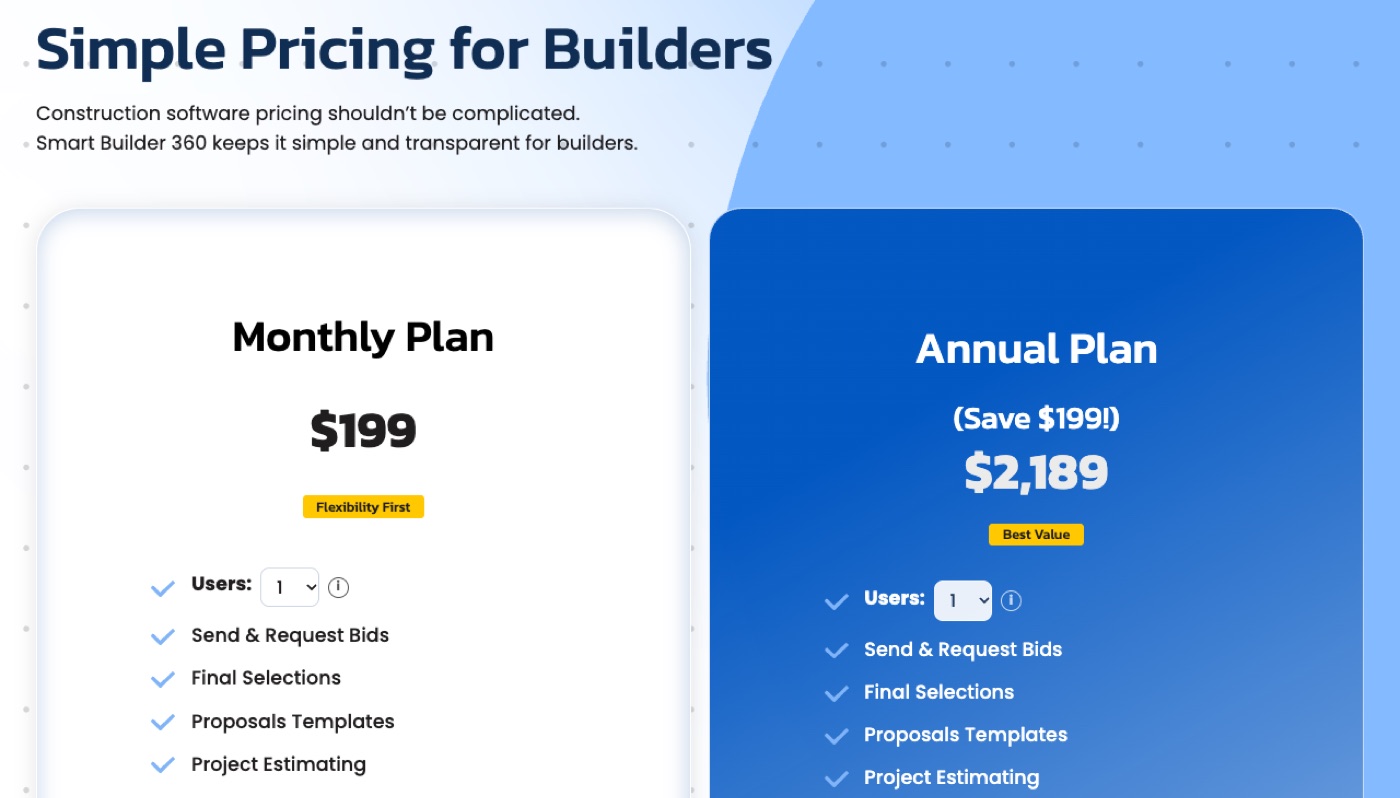
The plans list these features: Send & Request Bids, Final Selections, Proposal Templates, Project Estimating, Change Orders, Bank Draw Forms, Statement and Scheduling. The Project Estimator carries your cost categories, line items, margin, contract price and projected profit, and Estimated vs Actual tracks the real cost as the job runs.
Bank draw forms are built into the app, so you are not filling in a blank form for every draw. Smart Builder 360 is also endorsed by The Building Industry Association of Stark, The Ohio Home Builders Association (OHBA) & East Central Ohio. See the full details on our pricing page.
Choose by team size and growth plans, not by the cheapest headline in construction software pricing. A solo builder wants low cost and fast setup. A growing team wants fair per-user pricing and a plan that does not change under them. Match the plan to the next twelve months, not today.
Whichever you pick, run one live job through the free trial before you commit. A tool that fits your workflow saves more than a few dollars a month. If you want to see how an estimate becomes a budget in practice, read about construction budgeting software for home builders.
Before you sign, ask every vendor the same short list of questions, and get the answers in writing. These cover the costs that do not show up in the monthly price, and the ones that most often surprise builders at renewal, when it is harder to walk away.
These questions work for any vendor, including us. A company that answers them plainly is usually one you can work with.
Try Smart Builder 360 free for 30 days.
Run a real job through it before you pay. No credit card required.
Start Free Trial →Published prices for small-builder software run from about $49 a month for one user to $399 a month or more, as checked October 22, 2026. Some large platforms only quote by annual construction volume. Your cost depends on the plan, the number of users and any add-ons.
Vendors usually charge a flat monthly or annual plan, a base fee plus a price per extra user, tiered plans by features or users, or a quote based on how much construction you run each year. Many mix two of these.
For a small residential builder, plans often land between about $50 and a few hundred dollars a month, depending on users and features. Smart Builder 360 is $199 a month or $2,189 a year, plus $20 a month for each additional user.
Many vendors offer one, but the terms differ, so check each. Smart Builder 360 offers a 30-day free trial with no credit card required, so you can run a real job through it before you pay.
They can. Some reviewers report renewal increases, so ask each vendor for the renewal price in writing and whether it can be capped in the contract. We cover what reviewers say in our guide on Buildertrend and Procore renewals.
Flat pricing is easier to predict. Per-user pricing can be fair for a small team, but it grows as you hire. Work out the total for your real team size, now and a year from now, before you decide.
The lowest price is not always the lowest cost. A cheap plan that is missing estimating, change orders or draw forms means you pay for extra tools or do the work by hand. Compare the total for what you actually need.
Construction software pricing is easiest to judge when you compare the same things: the plan, the users, the extras and the renewal terms. Use published prices, add up a full year for your real team, and ask for the rest in writing.
Then test it on a live job. The right software pays for itself in saved hours and fewer mistakes, and the free trial is how you find out.

Our team of experts is ready to help around the clock.
