
If you're looking for a free construction estimating template, you're probably tired of rebuilding the same spreadsheet from scratch for every new job — or you've watched an estimate come in "close enough" and eaten the difference at closeout.
This template gives you a real, editable cost structure — organized by phase and cost category, with Estimated vs. Actual built in — plus the honest read on when a spreadsheet like this stops being enough.
By Smart Builder 360 Team | Principal Contributors: Dave Daugherty & Kurt Shank | Published: September 2026

According to CFMA research, roughly 78% of contractors under 50 employees still use Excel or Google Sheets as their primary estimating platform. That's not a knock on spreadsheets — for a lot of small builders, a well-built one is genuinely the right tool for where they are right now.
New to building estimates? Start with our lesson on how to estimate construction costs line by line. The problem isn't the spreadsheet. It's starting from a blank one every time, with no consistent structure, no cost categories that match how you actually track a job, and no easy way to see how the estimate compares to what the job actually cost once it's done.
This guide gives you a free, ready-to-use construction estimating template — organized by phase, broken into the cost categories that actually matter, with Estimated vs. Actual built into the structure. No invented unit costs. You fill in your own numbers from your own bids.
Almost every builder starts the same way: a blank spreadsheet, a rough list of line items, and a total at the bottom. It works for the first job. By the fifth job, it starts breaking down — and usually for the same handful of reasons.
A CFMA survey found that roughly 78% of contractors with fewer than 50 employees still use Excel or Google Sheets as their primary estimating platform. The fix isn't abandoning the spreadsheet — it's giving it the structure it's usually missing.
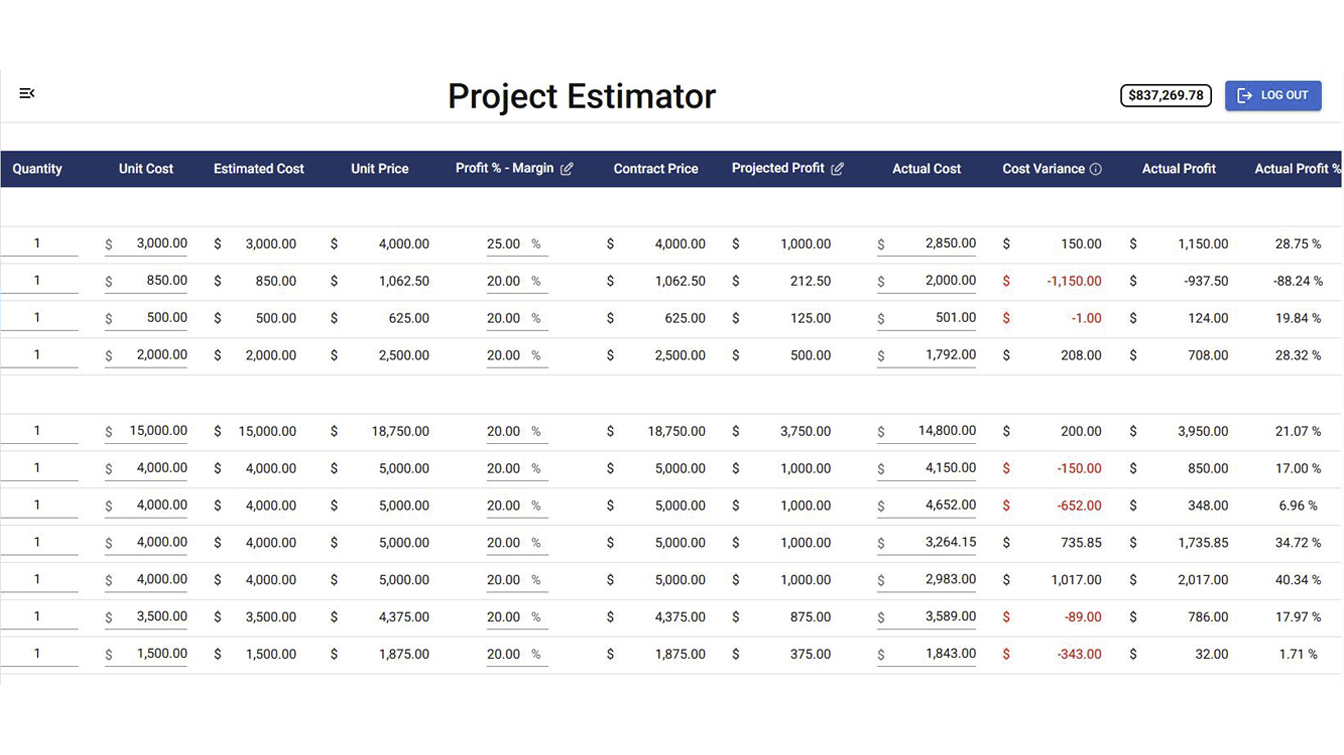
Before you fill anything in, the structure has to be right. A template missing any of these leaves gaps that show up later — usually as a cost you didn't see coming.
The template is a standard .xlsx file with three tabs, built so you can start using it in five minutes:
Start a free Smart Builder 360 trial and we'll send you the editable .xlsx template — the same phase and cost category structure the platform uses to track Estimated vs. Actual on every job.
Start My Free TrialNo credit card required. 30 days free.
Work through one phase at a time using your subs' bids and material quotes. Trying to fill in the whole sheet from memory in one sitting is exactly the "gut feel" problem this template is meant to fix.
Labor, Materials, Subcontractor, Allowance, Overhead, or Profit. This is what makes the Summary tab useful — without it, you just have a long list with a total, which is the spreadsheet you're trying to move past.
Cabinets, countertops, flooring, and fixtures are usually client selections that aren't locked in yet. Put a realistic placeholder in the Estimated Cost column and revisit it the moment the client makes a final selection.
The Variance column only earns its keep if you update it during the job. Waiting until the end to fill in actuals turns this into a postmortem instead of a tool that could have caught a problem in week three.
A five-minute weekly glance at where each cost category stands against estimate catches a subcontractor overrun or a runaway allowance while there's still time to do something about it.
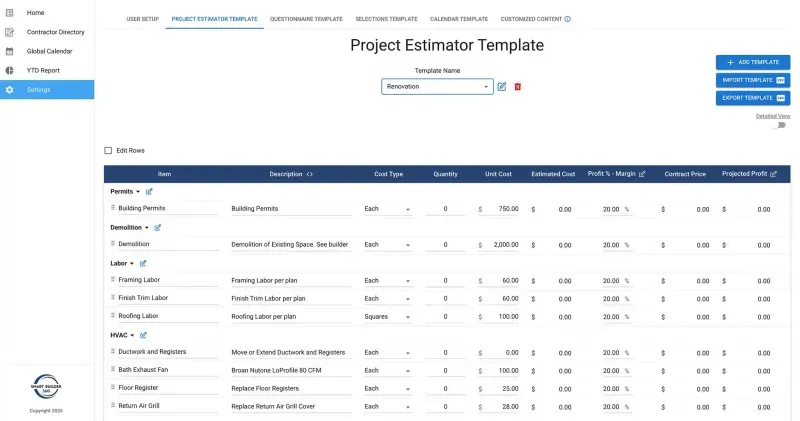
This template is your estimate — the internal number you need to actually run the job profitably. It is not your proposal, which is the client-facing document that usually applies your markup and doesn't expose your raw cost categories, vendor names, or line-item detail.
Keep them separate. Handing a client your internal cost estimate — allowances, sub pricing, and all — is how you end up negotiating against your own numbers. Build the estimate first, then build the proposal from it. For the full process on turning an estimate into a proposal that gets signed, see our guide on how to create a construction proposal that wins more jobs.
A spreadsheet like this one works well for a single job, run by one person, from start to finish. It starts to strain in a few specific, predictable situations:
Smart Builder 360 uses the same cost category structure as this template — Labor, Materials, Subcontractor, Allowances, Overhead, Profit — but connects it directly to your change orders and job cost tracking. When a change order is approved, the estimate updates. When an invoice comes in, Actual Cost updates. You see Estimated vs. Actual live, on every job, without re-entering a single number. See how that works in our guide on how to track job costs as a contractor, or the shorter version focused specifically on job costing for small builders. And if you're not sure whether you've actually hit that point yet, see our honest breakdown of when you outgrow the estimating spreadsheet — for a lot of builders, the answer is "not yet."
Stop rebuilding the same spreadsheet for every job.
Smart Builder 360 organizes your estimates by the same cost categories as this template — then connects them to your change orders and job cost tracking automatically. Starting at $199/month.
Try Now →30-day free trial. No credit card required.
A construction estimating template doesn't need pre-filled prices to be useful. It needs the right structure — organized by phase, broken into real cost categories, and built to compare what you estimated against what the job actually cost.
Download the template, fill it in with your own numbers, and use it as the starting point for every estimate from here on.
Use the template. Fill it in honestly. And when tracking it across multiple jobs by hand starts costing you more time than it saves — Smart Builder 360 picks up where the spreadsheet leaves off.
See how Smart Builder 360 connects estimating to job cost tracking, live.
30 days free. No credit card. Built by Ohio builders for builders who run real jobs.
Schedule Your Free Demo →A construction estimating template should organize costs by phase and by cost category — labor, materials, subcontractor bids, allowances, overhead, and profit. It should also leave room to track actual cost against estimated cost once the job is underway, so you can see variance instead of finding out at closeout.
Yes. The template is free to use in Excel or Google Sheets, with no pre-filled prices — you enter your own costs based on your own bids and vendor quotes, since unit costs vary too much by market and year to be reliable in a static template.
Yes. It's a standard .xlsx file with formulas built from SUM and SUMIF, both of which Google Sheets supports natively. Open it in Excel, or upload it to Google Drive and open it with Google Sheets — the formulas and formatting carry over. See our full walkthrough of opening this template in Google Sheets for the exact steps.
An estimate is your internal cost breakdown — what you expect the job to actually cost you, by category and phase. A proposal is the client-facing document built from that estimate, usually with your markup applied and without the internal cost detail exposed. This template is the internal estimate; it's the input, not the client deliverable.
The categories in this template — Labor, Materials, Subcontractor, Allowance, Overhead, and Profit — cover how most residential builders actually track cost. Keeping them separate on every line item is what makes a category-level rollup possible, instead of just a single project total.
When should a small builder stop using a spreadsheet for estimating?
A spreadsheet holds up fine for one job worked by one person. It gets harder to trust once you're running several jobs at once, need every estimate line item to update automatically when a change order is approved, or want to compare estimated vs. actual cost in real time without manually re-entering numbers from a separate cost-tracking sheet.

Our team of experts is ready to help around the clock.
