
If you downloaded our free estimating template and it's working fine, this isn't the article telling you to stop using it. It answers a specific question honestly: when do you outgrow the estimating spreadsheet, exactly — not vaguely?
By Smart Builder 360 Team | Principal Contributors: Dave Daugherty & Kurt Shank | Updated: September 2026
Most content about construction software tells every builder the same thing: your spreadsheet is holding you back, upgrade now. That's not honest, and it's not free advice — it's a sales pitch dressed up as a tip.
A well-built spreadsheet with real structure — cost categories, phase-by-phase line items, Estimated vs. Actual columns — is a completely legitimate way to estimate a home build. CFMA research puts the number at roughly 78% of contractors under 50 employees still using Excel or Google Sheets as their primary estimating platform. That's not a market waiting to be rescued. For a lot of that 78%, the spreadsheet is correctly sized to the job — see NAHB's own construction business management resources for the same builder-professionalization judgment call applied more broadly.
The real question isn't "spreadsheet or software." It's whether your specific situation has crossed one of a small number of concrete thresholds. Here they are.
If none of these three describe your business right now, that's a real answer, not a consolation prize: your spreadsheet is doing its job.
Some frustrations get blamed on the spreadsheet when the actual problem is how it's built, not what it's built in.
Fix the structure first. If the three signs above still apply after that, the spreadsheet itself — not just its formatting — is the limit.
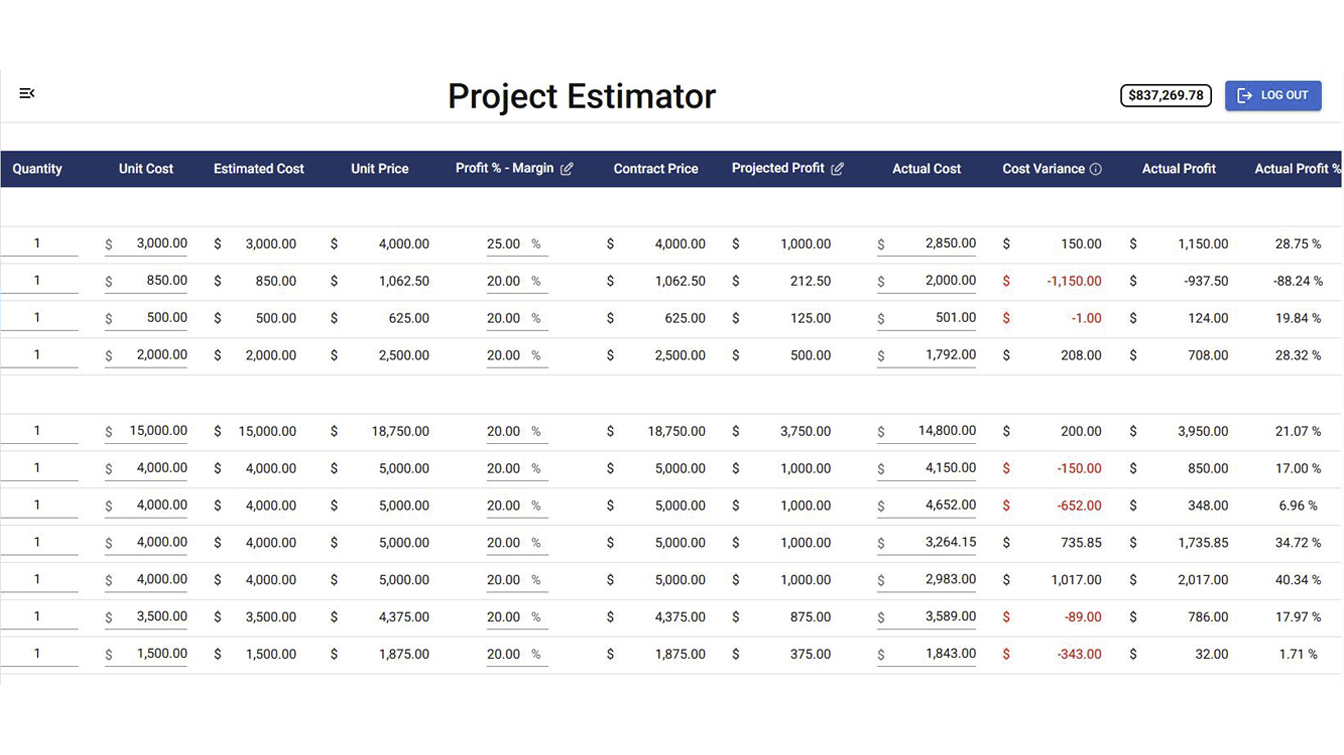
The risk isn't switching too early. Almost nobody does that. The risk is staying in a spreadsheet past the point where it can reliably do the job, because the failure is quiet — a missed change order ripple, a job that looked profitable until the actuals finally got entered three weeks after it closed. Is home builder software worth it for a small residential building company? Usually not for one job at a time with no help. Usually yes once you're past two of the three signs above — the hours spent reconciling files and chasing version conflicts start costing more than the software would.
Smart Builder 360 uses the exact same cost category structure as the free estimating template — Labor, Materials, Subcontractor, Allowance, Overhead, Profit — but connects it directly to change orders and job cost tracking, so an approved change order updates the estimate automatically and an incoming invoice updates Actual Cost without re-entering a number. See how the tracking side works in our guide on how to track job costs as a contractor.
Past the three signs? See what replaces the spreadsheet.
Same cost categories you already use, connected to your change orders and job cost tracking automatically. Starting at $199/month.
Try Now →30-day free trial. No credit card required.
When you're running more than one active job at a time, when change orders force you to manually update every affected line item, or when you need to see estimated vs. actual cost in real time instead of at closeout. If none of those apply yet, a well-built spreadsheet is still the right tool.
A solo builder running one job at a time can estimate reliably in a well-structured spreadsheet. Software earns its cost once you're juggling multiple jobs, multiple people need to see the same numbers, or change orders and cost tracking need to stay in sync automatically.
The right tool depends on volume. For one job at a time, a spreadsheet with Estimated vs. Actual columns is a legitimate job costing tool. Once you're tracking several jobs at once, software that ties job costing to your estimates and change orders automatically — like Smart Builder 360 — removes the manual re-entry that spreadsheets require.
It's worth it once the time spent maintaining spreadsheets, chasing version conflicts, and manually syncing change orders to your cost tracking exceeds the cost of the software. For a builder running one job with no help, it often isn't worth it yet. For one juggling several jobs or a small team, it usually is.
Yes. A spreadsheet with consistent cost categories, phase-by-phase structure, and Estimated vs. Actual tracking is a legitimate way to estimate one job at a time. It's not a lesser tool — it's the right tool for that volume.
It depends on whether the manual overhead you're already carrying — spreadsheets, version conflicts, disconnected tools — is costing you more time than the software would take to run. For a builder doing one job at a time, that investment often isn't justified yet. Past that point, the payoff usually shows up as hours reclaimed, not a number you can promise in advance.
Smart Builder 360 publishes its full pricing: $199/month for one user, plus $20/month for each additional person. Even with 15 additional users — 16 people total — the monthly cost stays under $500. For a builder working solo or with a small crew, the real cost sits well under that ceiling.
Don't switch because a piece of content told you to. Switch when your specific business has crossed one of three concrete lines: multiple jobs running at once, change orders that ripple across line items you have to track by hand, or needing real-time Estimated vs. Actual instead of a closeout surprise. Until then, a well-structured spreadsheet — like the free one linked above — is doing exactly what it should.
If you are ready to move the budget out of the spreadsheet, see how construction budgeting software works for home builders.

Our team of experts is ready to help around the clock.
