
By Smart Builder 360 Team | Principal Contributors: Kurt Shank & Dave Daugherty | Updated: September 2026
Job costing is tracking what a project actually costs once work is underway, and comparing that against what you estimated it would cost. Estimating happens before the job starts. Job costing happens during it. The two are only useful together — an estimate you never check against reality is just a guess you wrote down, and cost tracking with no estimate to compare against is just a pile of numbers.
For a small builder running one or two jobs, this can live in a spreadsheet just fine. The full process guide covers the fundamentals in depth — cost codes, common mistakes, moving from monthly reviews to real-time tracking. This piece is narrower: what to actually look for if you're deciding between job costing tools, and how Estimated vs. Actual specifically works.
Most job costing tools claim to do the same handful of things. Here's what separates a genuinely useful one from a glorified spreadsheet with a login screen:
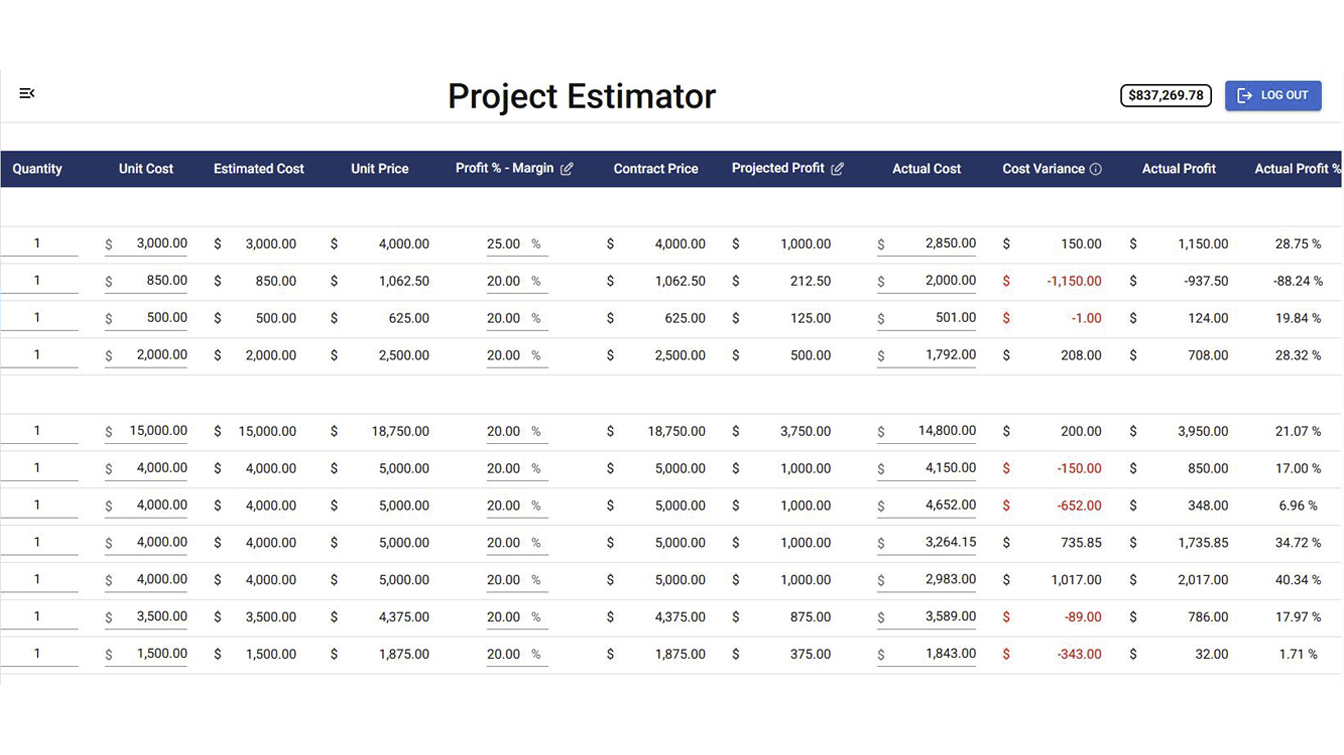
Estimated vs. actual cost tracking compares the numbers in your original project estimate against what a project is actually costing as work happens — labor, materials, subcontractors, and change orders. The gap between those two numbers is where profit is protected or quietly lost. A 3–5% miss on one job is easy to absorb. Across ten jobs, that same gap becomes real margin loss you may not notice until it's already gone.
In Smart Builder 360, this isn't a separate report you generate — it's the same cost categories from the Project Estimator, shown side by side with what's actually being spent, updating as change orders are approved and costs come in. See the full breakdown on the Estimated vs. Actual feature page.
Labor is one of the cost categories tracked inside Estimated vs. Actual, alongside materials, subcontractors, and overhead — it's part of the same side-by-side comparison, not a separate crew time-clock system. If a framing crew is running over the labor line you estimated, that shows up in the same view as everything else, instead of living in a separate payroll spreadsheet nobody cross-checks against the job budget.
If you are looking at this from the budget side, see our page on construction budgeting software for home builders.
To be honest about it: a spreadsheet with real cost categories and an Actual Cost column is legitimate job costing for one job at a time. We built a whole free estimating template around exactly that structure. Software earns its cost once you're running multiple jobs at once, want a change order to update the numbers without you touching them, or need the estimated-vs-actual comparison live instead of updated by hand. If you're not sure which side of that line you're on, see our honest breakdown of when you actually outgrow the estimating spreadsheet.
See Estimated vs. Actual on your own project.
Same cost categories as your estimate, tracked live as the job progresses — labor, materials, subcontractors, and change orders, side by side.
Try Now →30-day free trial. No credit card required.
Look for software that ties job costing directly to the estimate you already built, breaks cost into real categories (labor, materials, subcontractor, overhead), and shows estimated vs. actual side by side without manual re-entry. A tool that requires copying numbers between systems defeats the purpose.
Estimated vs. actual cost tracking compares the numbers in your original project estimate against what a project is actually costing as work happens, covering labor, materials, subcontractors, and change orders. The gap between those two numbers is where profit is protected or quietly lost.
In Smart Builder 360, labor is one of the cost categories tracked within Estimated vs. Actual, alongside materials, subcontractors, and overhead. It's part of the same cost comparison, not a separate crew time-clock system.
No. Estimating is building the cost projection before work starts. Job costing is tracking what the job actually costs once work is underway and comparing that to the estimate. One happens before the job, the other happens during it — and the two are only useful together.
A spreadsheet can absolutely do job costing for one job at a time if it's structured with real cost categories and an actual-cost column. Software earns its cost once you're running multiple jobs, need a change order to update the estimate automatically, or want the comparison live instead of updated by hand.
Job costing software is worth paying for when it does one specific thing a spreadsheet can't: keep estimated and actual cost in sync automatically as the job changes, across every category including labor, without you re-entering numbers. If you're running one job by hand and it's working, it's working — the shift to software is about volume and automation, not about the spreadsheet being wrong.

Our team of experts is ready to help around the clock.
