
By Smart Builder 360 Team | Principal Contributors: Kurt Shank & Dave Daugherty | Updated: September 2026
If you searched for a "google docs construction estimate template," here's the direct answer: not a separate one, and that's a deliberate choice, not a gap. Our free construction estimate template is built as a standard .xlsx file — nine phases, six cost categories (Labor, Materials, Subcontractor, Allowance, Overhead, Profit), and built-in Estimated vs. Actual columns. Google Sheets reads that file format natively, so a second, Sheets-only copy would just be the same spreadsheet maintained twice.
The SUM and SUMIF formulas that drive the automatic totals are supported natively in Sheets, so nothing breaks in the conversion — the phase totals and category rollups keep working exactly as they do in Excel. See Google's own guide to using Excel files in Sheets for the full list of what does and doesn't carry over.
Two identical spreadsheets in two formats means every future update — a fixed cost category, a corrected formula — has to happen twice, and the two copies drift out of sync over time. One real file, that already opens in both Excel and Sheets, is more useful than two half-maintained ones.
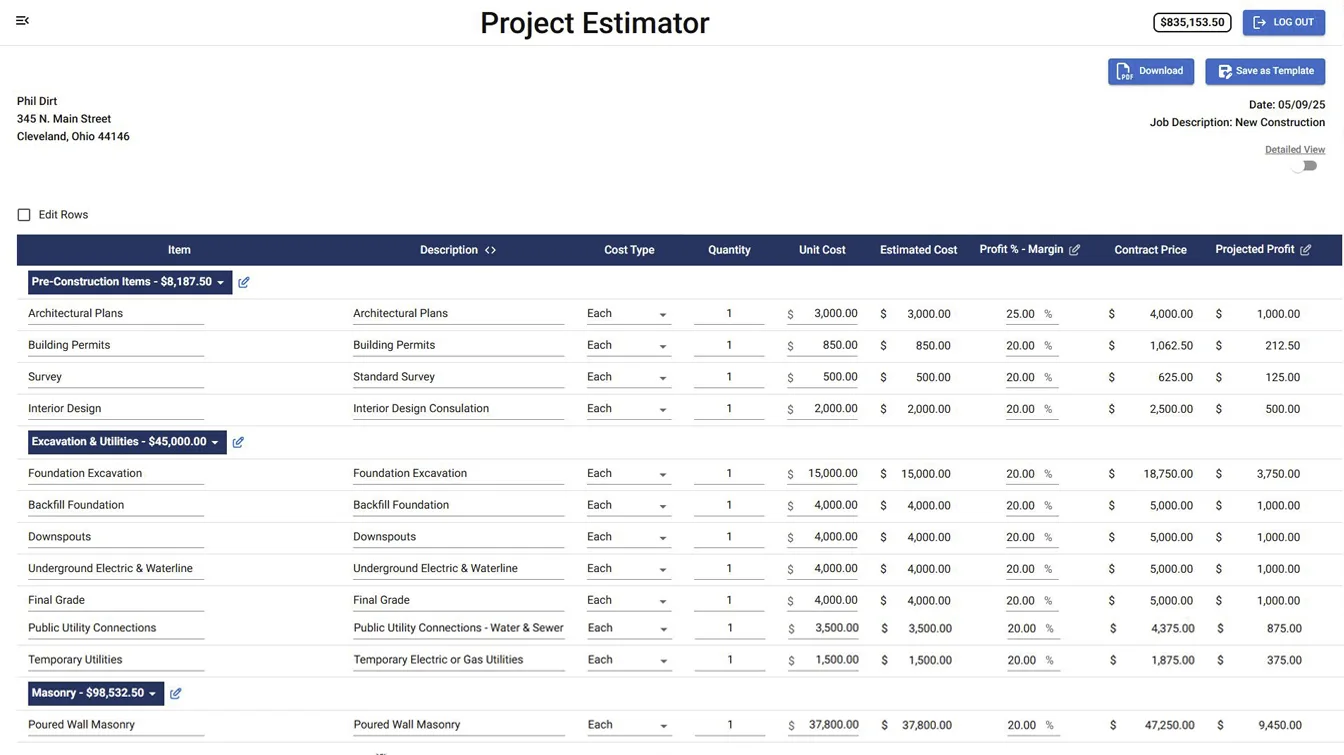
A static template — Excel, Sheets, doesn't matter — is the right tool for one job at a time. If you're running more than one job, or you're tired of the estimate and the actual cost living in two different places, the Project Estimator inside Smart Builder 360 uses the same cost category structure as the free template, except it's connected: it feeds directly into job costing and change orders, so numbers don't have to be copied by hand between systems. For the honest read on which side of that line you're on, see our breakdown of when you actually outgrow the estimating spreadsheet.
Build the estimate live instead of copying it into a new sheet every job.
Same cost categories as the free template — Labor, Materials, Subcontractor, Allowance, Overhead, Profit — connected to your job costing automatically.
Start My Free Trial →30-day free trial. No credit card required.
Smart Builder 360's free construction estimate template is a standard .xlsx file, which Google Sheets opens natively — upload it to Google Drive and open it as a Sheet, and the formulas and formatting carry over. There isn't a separate Google Sheets-only version, because the Excel file already works in Sheets without any changes.
Yes. Google Sheets supports standard Excel formulas like SUM and SUMIF natively. Upload the .xlsx file to Google Drive, open it with Google Sheets, and it converts automatically — no reformatting or rebuilding required.
Because it would just be a second copy of the same file with nothing new in it — the existing Excel template already opens cleanly in Sheets. Instead of maintaining two versions of the same static spreadsheet, the more useful next step for a builder who wants more than a static file is the live Project Estimator inside Smart Builder 360.
A live estimate connected to your job costing and change orders, so the numbers update automatically instead of you re-entering them by hand. That's what the Project Estimator inside Smart Builder 360 does, using the same cost category structure as the free template.
Yes. The downloadable Excel/Sheets-compatible template is free with no signup required. Using the live Project Estimator inside the app requires a Smart Builder 360 account, which comes with a 30-day free trial and no credit card.
You don't need a separate Google Sheets template — the free Excel one already works there. Download it if a static spreadsheet is still doing the job for you. If you're past that point, the same structure lives inside Smart Builder 360, connected to the rest of your project instead of sitting in a file by itself.

Our team of experts is ready to help around the clock.
