
By Smart Builder 360 Team | Principal Contributors: Kurt Shank & Dave Daugherty | Updated: October 6, 2026
Construction budgeting software is a tool that holds the budget for each job and shows how real costs compare to it as the work goes on. It answers three plain questions: what did I plan to spend, what have I actually spent, and where is the gap. For a home builder, that gap is where the profit lives.
A job budget is simply the plan for what a house should cost. Most small builders keep it in a spreadsheet. That works until there are several jobs, a few change orders, and a late night of copying numbers from one file to another.
Your budget starts from the Project Estimator, so the numbers are never typed twice. You build the estimate once, and it becomes the baseline you track the job against. There is no second file to set up and keep in line.
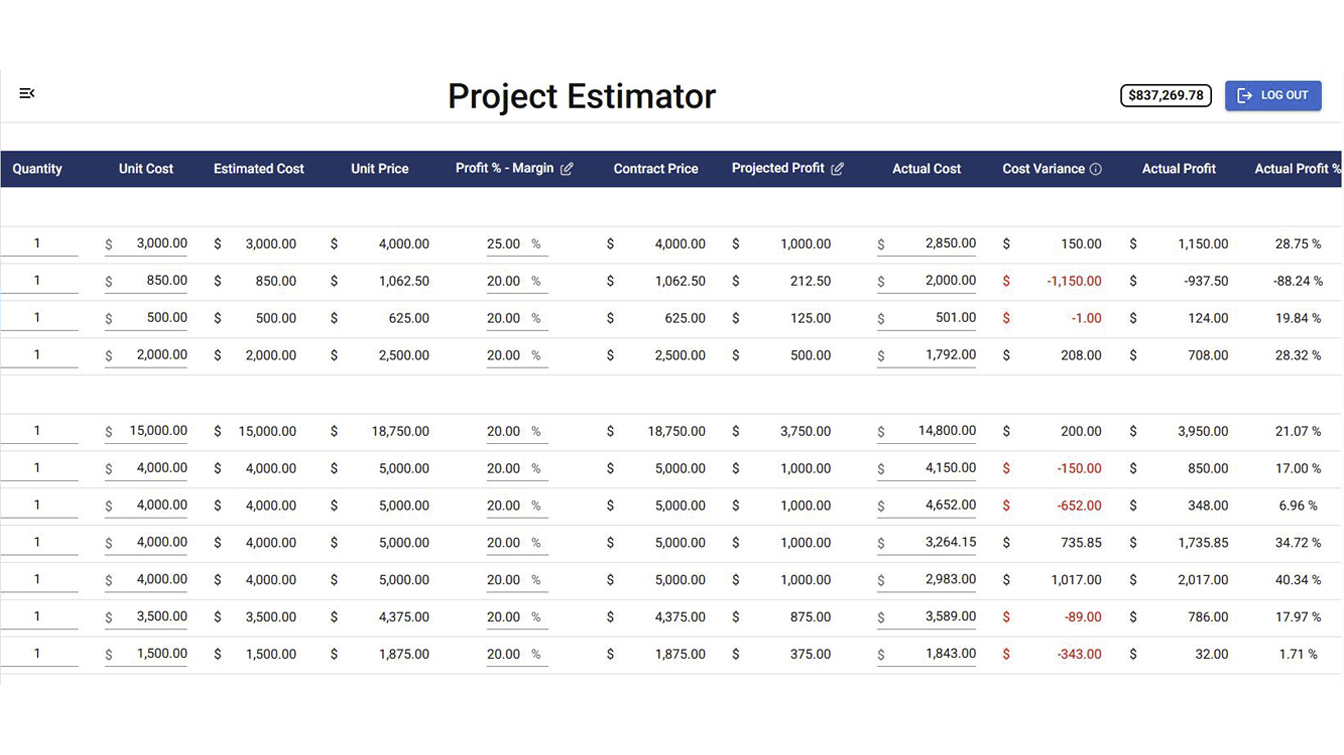
In the Project Estimator you build the estimate by cost category and line item, with the cost type, quantity and unit cost for each line. It shows your estimated cost, margin, contract price and projected profit. That is the plan. Everything after that is about how the real job compares to it.
As you enter actual costs, Estimated vs Actual shows the cost variance, the actual profit and the actual profit percentage for the job. You can see which lines are running over while the work is still going, which is when you can still change something.
For a full walkthrough of reading these numbers, see our guide on how to track job costs, and our look at job costing software for small builders.
A spreadsheet can hold a budget, but it cannot keep every job and every change in line without a lot of your time. The trouble starts when each job has its own file, a change order changes a number, and nobody is sure which version is right. If that sounds familiar, read when to stop estimating in spreadsheets.
| What you need | Spreadsheet | Smart Builder 360 |
|---|---|---|
| Budget from the estimate | Copy the numbers over by hand | Built from the Project Estimator |
| Actual cost vs estimate | You build and maintain the formulas | Estimated vs Actual |
| Cost variance and actual profit | More formulas to keep correct | Shown for each job |
| Bank draw forms | A separate document | Built into the app |
It is built for small residential builders and general contractors who run a handful of jobs at a time and want to know where the money is going, without hiring an office manager to find out. If that is you, construction budget software that ties the budget to the estimate saves real time.
If you run large commercial projects with a big accounting team, a heavier system may suit you better, and that is fine. For builders who want to keep their own books straight, NAHB offers construction business management resources that are worth a look alongside any software.
The price is public. Smart Builder 360 is $199 a month, or $2,189 a year, plus $20 a month for each additional user. There is no sales call needed to find out. You can also see the plans on the pricing page and start a free 30-day trial with no credit card.
Try Smart Builder 360 free for 30 days. No credit card required.
Start free trialIt holds the budget for each job and shows how real costs compare to it as the work goes on. For a home builder, that means knowing what you planned to spend, what you have actually spent, and where the difference is, before the job is finished instead of after.
Build the estimate by cost category and line item, with the cost type, quantity and unit cost for each line. That estimate becomes your budget baseline. In Smart Builder 360, the Project Estimator holds those numbers, so you are not copying them into a second file. That is what good construction budget software should do.
Yes. As you enter actual costs in Smart Builder 360, Estimated vs Actual shows the cost variance, the actual profit and the actual profit percentage. You can see which lines are running over while the job is still moving, which is when you can still do something about it.
Cost variance is the difference between what you estimated a cost would be and what it actually cost. A positive number means you spent less than planned. A negative number means you went over. Watching it line by line shows you where a job is slipping, before it adds up to a bigger problem.
For one job and one person, often yes. The trouble starts when you run several jobs, change orders keep changing the numbers, and nobody is sure which file is current. At that point a spreadsheet takes more of your evenings than it saves. Our guide on when to stop estimating in spreadsheets covers the signs.
Smart Builder 360 is $199 a month or $2,189 a year, plus $20 a month for each additional user. The price is public, so you can see it before you talk to anyone. There is a 30-day free trial with no credit card required, so you can test it on a real job first.
A good job budget is only useful if you can compare it to the real numbers while the job is still running. Smart Builder 360 builds the budget from your estimate and shows the gap as you enter actual costs, so you spend less time chasing spreadsheets and more time running the job.

Our team of experts is ready to help around the clock.
