
By Smart Builder 360 Team | Principal Contributors: Kurt Shank & Dave Daugherty | Updated: September 2026
Every construction contract is built around a defined scope: this house, these specs, this price, this schedule. A change order is what happens when reality doesn't match the plan — the client wants a different fixture, an inspector flags something that needs fixing before the next phase, or a wall comes down and there's rot behind it nobody could have seen at signing.
Instead of just doing the extra work and hoping to get paid, or arguing about it at the final invoice, a change order documents the change, prices it, and gets it signed before anyone picks up a tool. It becomes part of the contract — a specific, agreed-upon amendment, not a verbal promise.
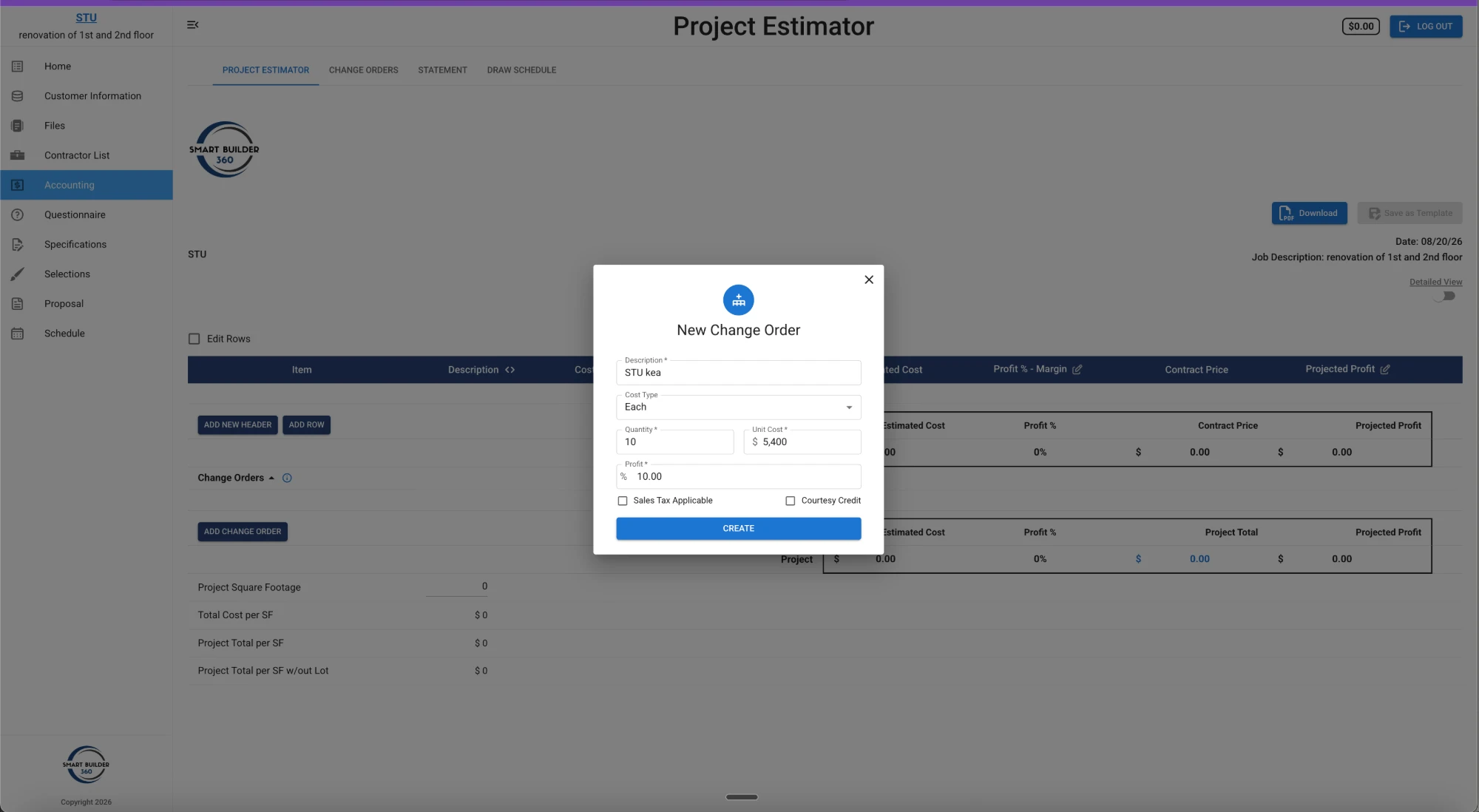
Inside Smart Builder 360, a change order is logged against the project the same way the original estimate was built — description, cost type, quantity, unit cost, and profit margin — and generates a signature-ready document directly from that data. See the full walkthrough in our guide to managing change orders in construction, or grab our free change order form template if you want the fields laid out for you.
A verbal agreement to change the scope is not a change order — it's a conversation that's easy to remember two different ways later. If the client says "I thought that was included" and the builder says "no, that was the change we talked about," a text message or a memory doesn't settle it. A signed document does.
This isn't a residential-only convention. The construction industry's own standard paperwork works the same way: the AIA's G701 Change Order form, used across commercial and institutional projects, is explicitly "not valid until signed" by every party involved. Small job or large, the principle doesn't change — a change order isn't in effect until it's signed.
This protects both sides. The builder has proof of what was approved and at what price. The client has proof of exactly what they agreed to pay extra for — nothing more, nothing assumed. See our full system for avoiding construction change order disputes if this is already a recurring problem on your jobs.
One change order is easy to keep straight. Five or six on the same job, each shifting the price and the schedule a little, is where builders lose track — not because anyone is being dishonest, but because a series of small changes adds up to a total contract price that's no longer what's written on page one.
Tracking every change order against the original estimate is what keeps the final invoice matching what was actually agreed to, and what makes an argument over the final bill nearly impossible — the paper trail already answers it.
The original contract sets the initial scope, price, and schedule — it's the baseline. A change order doesn't replace that contract; it amends a specific part of it. Both documents together define what's actually owed by the end of the job: the original scope, plus every signed change along the way.
Log it once. Get a signature-ready document automatically.
Smart Builder 360 generates a change order document directly from the same cost data as your estimate — no separate form to fill out by hand.
Try Now →30-day free trial. No credit card required.
A change order is a written, signed amendment to a construction contract that changes the original scope of work, cost, or schedule. It documents exactly what's changing, what it costs, and that both the builder and the client agreed to it before the work happens.
A change comes up — a client wants something different, or an unforeseen condition changes the scope. The builder documents the change, its cost, and its schedule impact in a change order, the client signs it, and only then does the work begin. Starting the work before signature is what turns a change order into unpaid work or a dispute.
Identify the change, document the scope and cost impact, submit it to the client in writing, get a signed approval, then perform the work. The contract should define how change orders are submitted and how long the client has to approve them, set before the first day of work.
Untracked change orders are the most common way builders do extra work without getting paid for it, or lose track of how a series of small changes has shifted the total contract price. Tracking every change order against the original estimate is what keeps the final invoice matching what was actually agreed to.
Yes, if you want it to be enforceable and to actually get paid for the work. A verbal agreement to change the scope is not a change order — it's a conversation that's easy to dispute later. A signed, written document is what protects both the builder and the client.
The original contract sets the initial scope, price, and schedule. A change order is a signed amendment to that contract — it doesn't replace the original agreement, it modifies a specific part of it, and both documents together define what's actually owed.
A change order is simply the paperwork that turns "let's also do this" into something both sides agreed to, priced, and signed — before the work starts, not after. Skip the writing and the signature, and you've turned a normal part of construction into a guessing game about who owes what.

Our team of experts is ready to help around the clock.
