
By Dave Daugherty, Principal at SB360 | Updated: August 2026
If you are looking for how to manage change orders in construction, you likely want to stop chasing approvals, avoid unpaid work, and protect every dollar of your profit. This guide covers exactly that — a proven step-by-step system used by real contractors to take back control of their projects and their money. New to the term itself? See our plain-English breakdown of what a change order actually is.
Understanding how to manage change orders in construction properly is what separates profitable contractors from the ones constantly fighting disputes and unpaid work. Let's be direct: change orders are one of the most mismanaged parts of running a construction business. Most contractors know how to do the work. They know how to swing a hammer, frame a wall, and pour a foundation. But when a client says "can you just add this one thing?" — that's where money quietly walks out the door.
A change order in construction is any modification to the original scope of work, contract price, or project timeline that was agreed upon at the time of signing. It can be triggered by the owner, the contractor, or even site conditions that were not anticipated.
And here is the reality: if you do not manage change orders in construction with a documented, signed process, you are working for free. Period.
Here is how it happens: a client asks for a last-minute upgrade. You say yes on the jobsite to keep the peace. Your crew does the extra work. You forget to document it. At closeout, the client disputes the bill — and you eat the cost.
Sound familiar? You are not alone.
Change orders do not just hurt your cash flow. They create:
The contractors who protect their profit margins know how to manage change orders in construction before the first shovel hits the dirt. They treat change order management not as paperwork, but as a core part of running a profitable construction business.
This is the proven process for how to manage change orders in construction the right way — the process that separates profitable contractors from the ones constantly putting out fires. Follow these seven steps on every single project, without exception.
Before a shovel touches the ground, your contract should define exactly how change orders will be handled. This means: how they are submitted, how long the owner has to approve them, what happens to the schedule when one is issued, and your right to stop work until approval is received.
Most contractors skip this step. That is exactly why they fight with clients over change orders later.
The moment you recognize that something falls outside the original scope, stop and document it. Do not wait until the end of the week. Do not mention it verbally and hope the client remembers. Write it down the same day it is identified.
Note the date, the description of the change, and who requested it.
Every change order must include a clear cost estimate and a time impact assessment. How much more will this cost? How many days will this add to the schedule? Be specific. Vague numbers create disputes.
Use your actual labor rates, material costs, and overhead markups — not gut feelings.
Issue a formal, numbered change order document. Every change order in your project should have its own unique number for tracking. The document should be professional, clear, and reference the original contract.
If you are doing this on a napkin or a text message, you are setting yourself up for failure. Here is what that actually looks like inside Smart Builder 360 — description, cost type, quantity, unit cost, and profit margin, all logged against the project in under a minute:
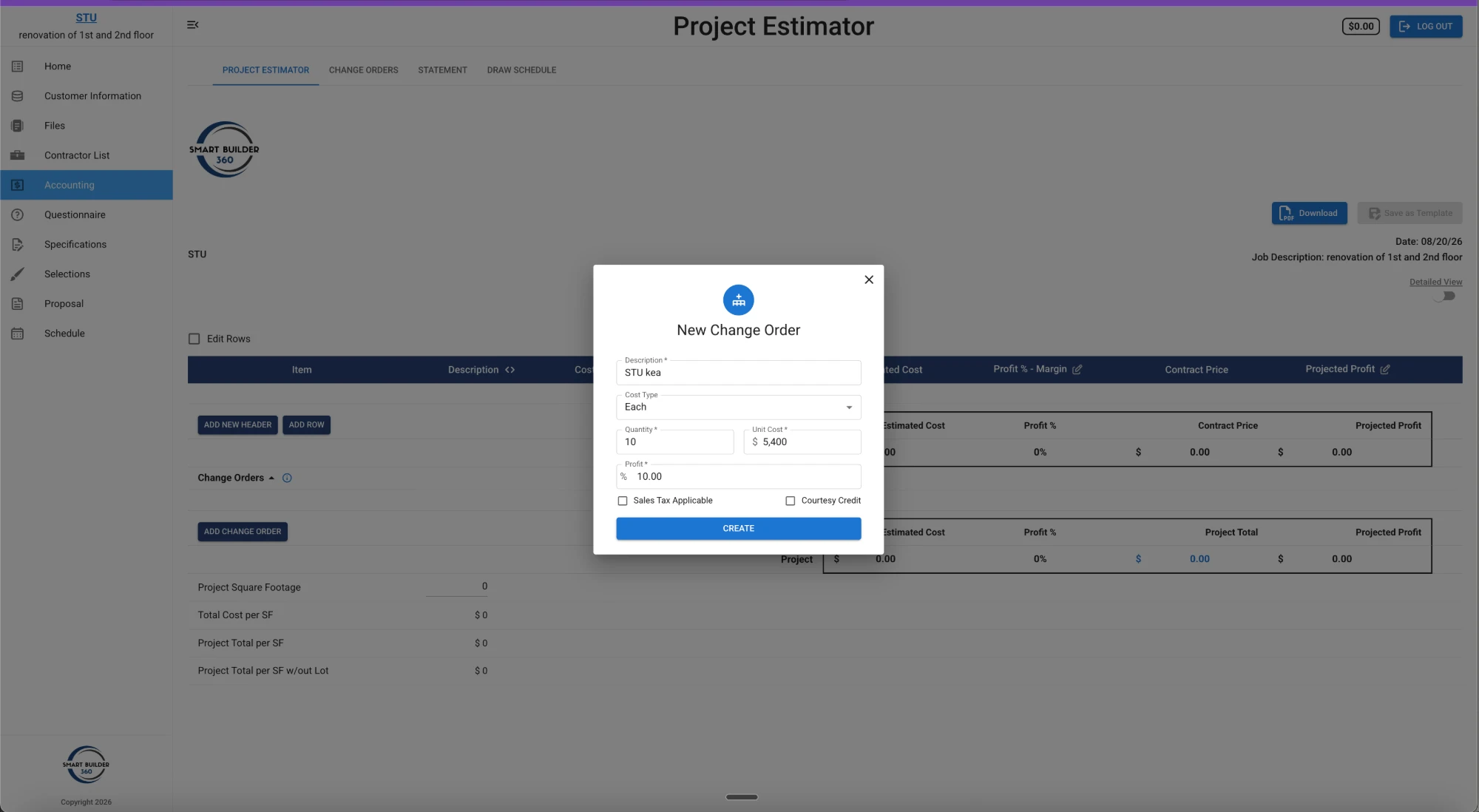
This is the rule that most contractors break — and it is the one that costs them the most. Do not start additional work until you have a signed, written approval from the owner.
Verbal approvals are not approvals. A signed document is.
Once approved and executed, the change order should be folded into your job cost tracking. Update your budget, update your schedule, and update your subcontractor agreements if applicable.
A change order is not done when the client signs it. It is done when it is fully reflected in your project data. Learn how construction job cost tracking keeps every approved change accounted for in real time.
Your change order should specify exactly when payment is due — whether that is on the next draw, at project completion, or immediately upon approval. Do not leave payment timing open to interpretation.
Follow your payment schedule just as you do with the base contract.
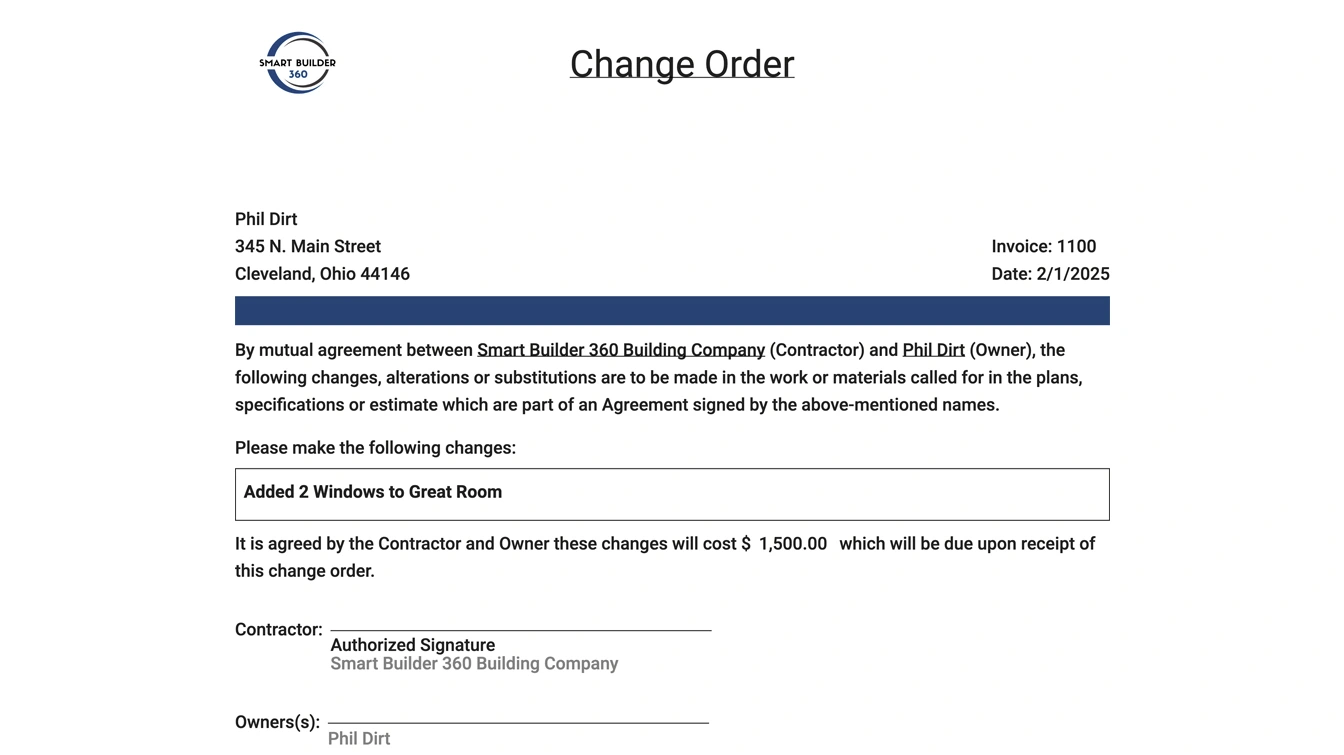
A professional change order is not just a formality — it is your legal protection. Every change order you issue should include these core elements:
Sloppy change orders are a legal liability. Professional change orders are a profit protector. Here's a real example generated straight from a project — every element above is present, top to bottom:
Not all change order tools are built the same. Here is how common options stack up for contractors managing real construction projects:
| Tool / Method | CO Tracking | Cost Impact | Client Approval | Schedule | Best For |
|---|---|---|---|---|---|
| Smart Builder 360 | Full logging | Real-time vs. estimate | Built-in flow | Integrated | Residential & commercial contractors |
| Spreadsheets | Manual, error-prone | Manual | None | None | Solo builders, low volume |
| Procore | Enterprise-level | Advanced | Full workflow | Full | Large commercial firms |
| Buildertrend | Solid tracking | Budget tools | Client portal | Module | Mid-size residential builders |
| Paper Forms | None | None | None | None | No one. Stop using these. |
Smart Builder 360 was designed by builders, for builders — which means the change order process inside it reflects how construction actually works on the ground.
Knowing how to manage change orders in construction means knowing what not to do just as much as what to do. Here are the most common mistakes — and how to fix them before they cost you:
Mistake #1: Doing the work first, documenting later. You are essentially working on faith. Fix: Nothing starts without a signed CO.
Mistake #2: Using vague scope descriptions. "Additional electrical work" is not a scope description. Be specific every time.
Mistake #3: Forgetting to update the schedule. Every CO must include a written schedule impact, even if it is zero days.
Mistake #4: Treating change orders as optional. Reframe them as a professional transparency tool — they protect the client as much as they protect you.
Mistake #5: Not numbering and tracking each one. Use a system that assigns automatic tracking numbers and shows the running total against your original contract.
Let's talk about the elephant on the job site: clients who resist change orders.
Lead with documentation, not emotion. Show them the original contract scope and exactly where the new request deviates from it. Documents do not argue. They inform.
Explain the cost in terms they understand. Walk them through it: "This requires four additional hours of labor at our standard rate, plus the material cost. Here is the breakdown." Transparency builds trust.
Separate the decision from the relationship. Make clear that issuing a change order is not adversarial — it is the professional way both parties are protected.
Give them options. Offer to proceed with the change, defer it to a future phase, or modify the scope to reduce cost.
Know when to stand firm. If a client consistently refuses to authorize change orders but still expects the work to happen, that is a red flag. Profitable contractors hold the line.
Manual change order management — sticky notes, text messages, spreadsheets — works until it does not. And when it fails, it tends to fail expensively.
The right software eliminates the chaos. A modern construction change order management system should let you log a change order in minutes, automatically number each one, show you the real-time cost impact, generate professional approval documents, and update your schedule the moment a change is approved.
That is exactly what Smart Builder 360 is built to do — the same estimator screen shown above generates the signature-ready document further up this page, with nothing re-typed in between.
Pair your change order process with a solid construction project scheduling system so every approved change flows into your timeline automatically. If you are still managing change orders by hand, you are leaving money on the table on every single job. Start your free trial of Smart Builder 360 and run your next change order through the system.
A change order is a written document that modifies the original construction contract — adjusting the scope of work, the contract price, the timeline, or all three. It must be agreed upon and signed by both the contractor and the owner before the additional work begins.
Either the owner, the contractor, or a design professional (such as an architect or engineer) can initiate a change order. Regardless of who initiates it, it must be documented in writing and approved by all relevant parties before execution.
If you perform work without a signed change order, you significantly weaken your legal and contractual position. The owner may dispute the cost, claim it was included in the original scope, or simply refuse to pay.
Whatever your contract defines — set the approval window before the job starts. Best practice is to write a specific response deadline into your original contract, along with what happens if the client doesn't respond in time: the work pauses, or the change is considered declined. That way you're never stuck waiting on an approval with a crew standing by, and there's no argument about it later — the answer was agreed before the first nail went in.
Yes. A client can refuse. However, if the change clearly falls outside the original scope, you have the right to stop work on that portion of the project and seek resolution through mediation, arbitration, or legal action. Document everything.
Every change order should be evaluated for its schedule impact. Some changes are minor and add no time. Others can extend the project completion date significantly. Always document the time impact in writing.
A change order is a mutually agreed-upon modification signed by both parties. A change directive is issued when the owner and contractor cannot agree on cost, but the owner still needs the work done. Cost disputes are resolved later.
There is no magic number. However, a high volume — particularly owner-initiated ones — often signals poor initial planning, incomplete drawings, or scope creep. Document every one.
Learning how to manage change orders in construction is not just an administrative skill — it is one of the highest-leverage profit skills you can build as a contractor. The better your process, the more money you keep.
Every unsigned change order is potential revenue you may never collect. Every undocumented scope change is a dispute waiting to happen. Build the process. Use the right tools. Get everything in writing. And if you want to go further, read our guide on how to create a construction proposal that wins more jobs — every dispute-proof change order starts with a solid contract.
Smart Builder 360 was built by people who have been on the job site, been burned by undocumented changes, and decided there was a better way. See it for yourself — start your 30-day free trial today, no credit card required.
Let's build smarter, together.

Our team of experts is ready to help around the clock.
