By Smart Builder 360 Team |
Principal Contributors: Kurt Shank & Dave Daugherty |
Updated: September 2026
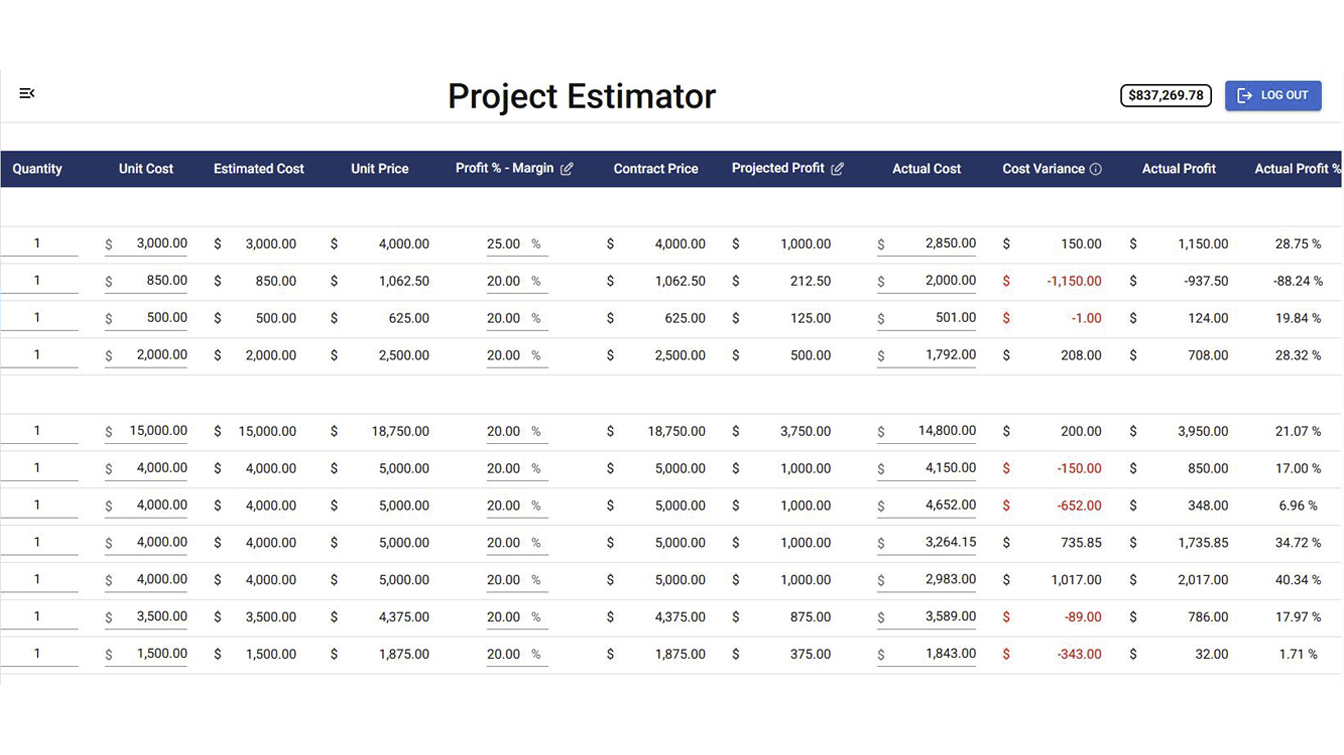
Estimated vs Actual tracks actual cost against your original estimate, the cost variance between the two, actual profit, and actual profit percentage — by cost category, updating as the job runs. That means you see where a category is drifting from the estimate while the job is still live, not at closeout when it's too late to do anything about it.
If you've only ever found out a job ran over budget after it was finished, this is the view that changes that. Here's how to actually use it on a live job.
Step 1: Open the Project's Estimated vs Actual View
1Open the project you want to review and go to Estimated vs Actual. It's built directly from the estimate you already set up for the job, so there's nothing extra to configure — it's just a different view on the same numbers.
Step 2: Read the Cost Variance by Category
2Look at the variance column for each cost category. Variance is the difference between what you estimated and what the category has actually cost so far. A category running significantly over is worth a closer look while the job is still active — not after the fact.
Estimated vs Actual in Smart Builder 360 — actual cost, variance, and profit tracked by category.
Step 3: Check Actual Profit and Actual Profit %
3Check actual profit and actual profit percentage for the job. These update as actual costs come in, so they reflect where the job really stands financially right now, not just what was projected when you built the estimate.
Step 4: Make It a Habit, Not a Closeout Task
4Check it as costs come in, not just at the end of the job. The whole value of this view is catching a category drifting over budget while you still have time to address it — a spreadsheet you update once at closeout can't do that.
If you haven't set up your project estimate yet, that's the starting point this view is built from — see our guide on setting up your first project for the full walkthrough.
Ready to check where your active job stands?
Log in and open Estimated vs Actual on your current project.
What does Estimated vs Actual track in Smart Builder 360?
It tracks actual cost against your original estimate, the cost variance between the two, actual profit, and actual profit percentage — by cost category, on a live job.
Do I need to wait until the job is finished to see this?
No. It updates as actual costs come in during the job, so you can see where a category is running over before the job closes out, not after.
What is cost variance?
Cost variance is the difference between what you estimated for a cost category and what it actually cost. A positive or negative variance shows you exactly where a job is drifting from the original numbers.
Where do I find Estimated vs Actual for a project?
Open the project you want to review and go to its Estimated vs Actual view, where cost categories, actual cost, variance, actual profit, and actual profit percentage are laid out side by side.
Contact us
Need Help? We are here for you
Our team of experts is ready to help around the clock.