
By Smart Builder 360 Team | Principal Contributors: Dave Daugherty & Kurt Shank | Updated: September 2026
Most builders don't start out looking for "scheduling software" — they start out with a spreadsheet or a wall calendar that stopped working. The point where that breaks down is usually the same: one date changes, and now three other things need updating by hand, and something gets missed. Software earns its keep by removing that manual re-checking, not by looking nicer than a spreadsheet.
This is a short, practical checklist for what to actually evaluate — not a full walkthrough of how to build a residential construction schedule from scratch. For that deeper process, including a 7-step build-out and common scheduling mistakes, see our full residential construction scheduling guide.
This checklist is deliberately short. A longer feature list looks impressive on a sales page but doesn't change what actually prevents a job from slipping — these five do.
Here's Smart Builder 360's scheduling view on an active project — phases, dates, and task ownership in one shared view instead of a spreadsheet passed around by email:
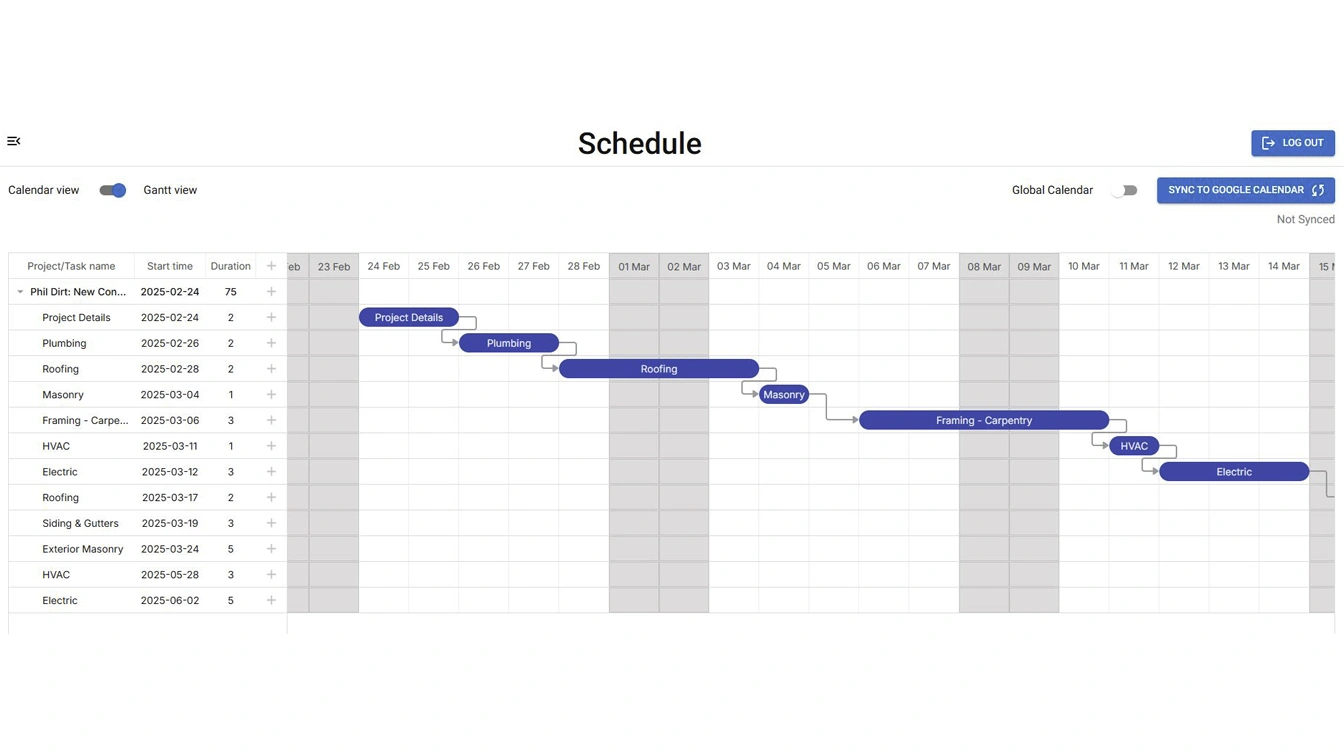
A scheduling app by itself can absolutely keep dates straight. What it usually can't do is tell you that a date slipped because a change order wasn't approved yet, or that a client selection deadline is about to push back framing. That connection only exists if the schedule lives inside the same system as your budget, change orders, and draw requests — not bolted on next to them.
That doesn't mean every builder needs a fully connected platform. If your workflow genuinely is just dates and nothing else touches them, a lighter standalone tool may be enough. The checklist above still applies either way — it's the minimum bar, not a case for one type of tool over the other.
Smart Builder 360 keeps a centralized schedule that syncs across your entire team, built on the same project data used for estimating, change orders, and bank draw forms — so a schedule slip and the change order that caused it are the same conversation, not two disconnected tools. It offers a 30-day free trial with no credit card required.
A centralized schedule the whole team can see, dependencies that shift automatically when one task moves, trade and subcontractor assignments tied to each phase, inspection and material lead-time tracking, and change orders or client selections reflected on the same schedule instead of a separate document.
It depends on how connected you need the rest of your workflow to be. A standalone scheduling tool can track dates well on its own, but it won't tie those dates to your budget, change orders, or draw requests. A connected builder platform keeps schedule changes linked to the decisions and documents that caused them.
Not necessarily a full Gantt chart specifically, but it does need dependencies — the ability for one task's date shift to automatically move the tasks that depend on it. Without that, you're manually re-checking the whole schedule every time one thing changes.
It keeps a centralized schedule that syncs across your entire team, connected to the same project data used for estimating, change orders, and bank draws — so a schedule change doesn't live in a separate, disconnected tool.
Five features decide whether scheduling software actually helps: a shared schedule, cascading dependencies, trade assignment, inspection/lead-time tracking, and change orders tied to the same dates. Everything past that checklist is preference. For the deeper how-to — building a schedule step by step, avoiding common residential scheduling mistakes, and handling client pushback on dates — see our full residential construction scheduling guide.

Our team of experts is ready to help around the clock.
