If you are searching for general contractor project management software, you are probably trying to get jobs, documents, estimates, contractors, schedules, and money out of separate places. The work is not always the problem. The missing details are.
This guide shows what general contractors should look for, which workflows matter most, and how Smart Builder 360 keeps the job record tied together without turning the builder into a full-time software operator.
- What Is General Contractor Project Management Software?
- Why Project Management Software Matters for General Contractors
- The 7-Step General Contractor Project Management Software Process
- What Every Project Management System Must Include
- General Contractor Project Management Software Tools Comparison
- Common Project Management Mistakes
- How to Handle Team Pushback
- Automating Project Management with Software
- Frequently Asked Questions
- The Bottom Line
What Is General Contractor Project Management Software?
General contractor project management software is a system that keeps project information, estimates, documents, contractors, schedules, change orders, statements, and draw schedules organized in one place. It gives the builder one job record instead of five different versions of the truth.
Here is the reality: most job problems start small. A missing file, an outdated estimate, a contractor who did not get the latest information, or a change order that never made it into the numbers.
- Customer information lives in one place
- Project details live somewhere else
- Files sit in email threads
- Change orders get tracked after the work is done
- Draws and statements get rebuilt by hand

Why Project Management Software Matters for General Contractors
General contractors do not lose control because they are bad builders. They lose control because the job has too many moving parts and no single system holding them together.
What it looks like on the job:
- The estimate changes, but the proposal does not
- The contractor list is out of date
- A file gets sent, but nobody knows which version is current
- A change order shows up in the statement late
- The draw schedule does not match the real project total
What this creates:
- More calls
- More rework
- More disputes
- Less profit control
- More stress for the builder
Project management is not office work. It is job control.

The 7-Step General Contractor Project Management Software Process
A good project management process starts with one rule: every important job detail needs a home. If the team has to guess where something lives, the system is already leaking.
Step 1 — Create one project record
Start every job with one project record.
- Customer name and contact details
- Project description
- Project status
- Project address
- Budget fields
- Start date and completion date
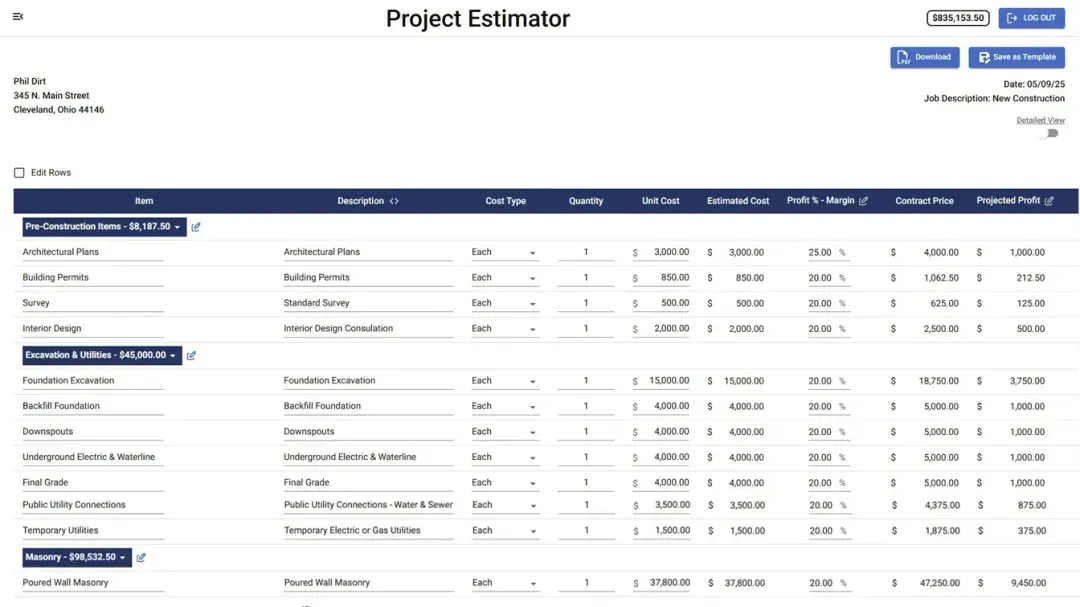
Step 2 — Build the estimate before the work starts
The estimate should show the real job, not a rough number sitting in a spreadsheet.
- Line items
- Cost type
- Quantity
- Unit cost
- Estimated cost
- Contract price
- Projected profit
Step 3 — Assign contractors by phase
Contractor coordination breaks down when the builder has to remember who belongs to which part of the job.
No phase = no clean handoff.
Step 4 — Keep documents in the project
Files, folders, proposals, specifications, selections, statements, and draw schedules should stay with the job. If the document matters, it belongs in the project record.
Step 5 — Track change orders inside the job
Change orders should show date, invoice number, description, and amount. If extra work is not documented, it becomes a memory contest.
If it is not written down, you are one argument away from working for free.
Step 6 — Review money and schedule together
Look at projected profit, statements, draw schedules, project totals, start dates, completion dates, and days under construction together. A job can look busy and still be drifting.
Step 7 — Print, download, or send clean records
When a customer, contractor, lender, or office team needs information, the record should be clean enough to share. That is where proposals, specifications, selections, statements, and draw schedules protect the builder.
What Every Project Management System Must Include
A useful project management system includes the job facts, the money, the documents, the people, and the timeline. If one of those is missing, the builder still has to manage part of the job by hand.
Essentials
- Customer information
- Project information
- Project status
- Files and folders
- Contractor list
- Estimate and proposal
- Change orders
- Statement
- Draw schedule
- Specifications and selections
- Schedule and calendar tools
Protection Clauses
- All change orders should be documented before work proceeds
- Customer-facing documents should be printable or downloadable
- Project totals should reflect approved changes
- Contractor information should be tied to the project
- Draws and statements should match the current job record
A scattered system costs you money. A clean one protects it.
General Contractor Project Management Software Tools Comparison
The best general contractor project management software depends on the kind of jobs you run. A large commercial GC needs a different system than a small residential builder trying to keep estimates, contractors, documents, and draw schedules under control.
| Tool | Project Record | Estimate / Change Orders | Contractor Coordination | Documents / Draws | Best For |
|---|---|---|---|---|---|
| Smart Builder 360 | ✅ Customer info, project info, status, dates, budget fields, and project workspace | ✅ Estimator, proposal, change orders, job totals, and projected profit | ✅ Contractor list, phase management, assigned contractors, files, and send-info workflow | ✅ Files, specifications, selections, statements, draw schedules, print/download, and SignHere options | Small-to-mid residential builders and general contractors who want one builder-first system |
| Buildertrend | ✅ Broad residential project management workspace | ✅ Estimating, change order, and financial workflows | ✅ Strong client and subcontractor communication workflows | ✅ Broad document and project communication tools | Residential builders needing a larger client-facing platform |
| JobTread | ✅ Project management workspace for construction jobs | ✅ Strong estimating and job management tie-ins | ✅ Contractor and customer workflows are part of the platform | ⚠️ Draw/payment workflow should be verified by plan | Builders who want estimating-first job management |
| Contractor Foreman | ✅ Broad project management toolset | ✅ Estimating and project tools are available | ✅ Contractor and customer communication tools | ⚠️ Varies by setup and package | Contractors who want many tools at a lower entry cost |
| Procore | ✅ Enterprise-level project controls | ✅ Large construction financial ecosystem | ✅ Deep team collaboration | ✅ Strong enterprise document and financial controls | Large GCs, commercial teams, and enterprise construction firms |
| Excel / Sheets | ⚠️ Works for a static project list | ❌ No automatic tie-in to change orders or statements | ❌ No built-in contractor workflow | ❌ Manual files, draws, and statements | Builders who need a temporary starting point |
Smart Builder 360 reflects real jobsite workflows, not software theory.
Common Project Management Mistakes
Most project management mistakes are not dramatic. They are small misses that keep stacking up until the builder cannot tell which number, file, or schedule is current.
- Keeping job information in too many places
Fix → Create one project record and work from it. - Separating the estimate from the proposal
Fix → Keep estimate details connected to customer-facing documents. - Tracking change orders after the work is done
Fix → Document the change before it becomes labor. - Managing contractors from memory
Fix → Assign contractors by phase and keep their details in the job workflow. - Rebuilding statements and draws by hand
Fix → Use software that keeps job totals, changes, statements, and draw schedules aligned.

How to Handle Team Pushback
Team pushback is normal when a builder changes how jobs are managed. The answer is not more meetings. The answer is a cleaner process that saves people from chasing information.
- Start with one live job. Prove the system on real work.
- Keep the first workflow simple. Start with customer info, estimate, files, contractor list, and schedule.
- Use the same rule every time. If it affects the job, it goes in the project record.
- Proceed with the current process for active jobs
- Move new jobs into the software first
- Reduce duplicate spreadsheets once the team trusts the record
Know when to hold the line. A system only works if the team uses it every time.
Automating Project Management with Software
Manual systems fail under pressure. When a general contractor has multiple jobs moving at once, the project record has to connect with estimating, documents, contractors, schedules, and money.
A proper system does five things:
- Keeps project facts in one place
- Connects estimating with proposals and change orders
- Keeps files and documents tied to the job
- Supports contractor coordination and schedule control
- Shows statements, draw schedules, and projected profit clearly
That is exactly how Smart Builder 360 was built.
Builders do not need more tools. They need fewer problems.
Related Smart Builder 360 Resources
- Smart Builder 360 homepage
- project management software for builders
- construction scheduling software for residential builders
Frequently Asked Questions
What is general contractor project management software?
General contractor project management software is a system that helps builders organize project information, estimates, documents, contractors, schedules, change orders, statements, and draw schedules in one place.
What should a general contractor look for in project management software?
A general contractor should look for software that connects the estimate, schedule, contractor list, files, change orders, customer documents, and financial records without adding unnecessary office work.
Project management software vs scheduling software: what is the difference?
Scheduling software focuses on dates and phases. Project management software connects those dates to estimates, documents, contractors, change orders, statements, draw schedules, and job records.
Can a general contractor use spreadsheets to manage projects?
A general contractor can use spreadsheets for one simple job, but spreadsheets break down when estimates, documents, change orders, contractors, and payments all need to stay connected.
Does Smart Builder 360 include estimating and change orders?
Smart Builder 360 includes project estimating, proposal output, change order tracking, projected profit, statements, and draw schedule tools inside the project workflow.
Who is Smart Builder 360 built for?
Smart Builder 360 is built for small-to-mid residential builders and general contractors who want a builder-first system for estimating, scheduling, documents, contractor coordination, and financial control.
The Bottom Line
Project management is not about making a builder stare at software all day. It is about keeping the job clear enough that the builder can run the work.
- No project record = missing details
- No change order trail = lost money
- No document system = confusion
- No financial control = profit risk
Build the process. Stick to it every time.
Smart Builder 360 was built by builders who lived this.
Run your next project with fewer loose ends.
Start your free trial and manage your next project the right way.
Start your free trial